Amazon is the world's most popular online marketplace, and its review system is full of useful information. You can use it to research products, understand public opinion, or track your competitors.
In this guide, we'll show you how to get Amazon reviews without using code or paying for expensive tools. You'll learn how to capture key details like ratings, review text, timestamps, and reviewer info using simple, no-code methods.
We'll use free tools, clever browser tricks, and a bit of organised thinking to sort out the data you collect. There's no need for complicated Python or scripting—just simple steps anyone can follow. Let's get started!
Why scrape Amazon reviews?
Amazon is one of the largest online marketplaces in the world, and its review system is a goldmine of customer opinions, product insights, and market signals. This makes Amazon reviews a prime target for data-driven decision making. Scraping Amazon review data empowers various use cases, including:
Understand customer needs
Reviews are the most honest focus group you could ask for. Customers write about:
What problem they were trying to solve
Why they chose a specific product
What delighted them
What disappointed them
By using an amazon review scraper, you can aggregate thousands of these comments to discover patterns that are not obvious when you skim a few pages. For example:
Repeated complaints about battery life in a niche electronic product
Constant praise for packaging in a beauty product
Confusion about sizing in apparel
Instead of guessing what customers care about, you see their priorities in their own words. This makes your positioning, messaging, and product design more precise than brands that only rely on internal assumptions.
Validate product ideas
Launching a new product without validation is expensive. Scraping Amazon reviews gives you real-world proof before you invest heavily. You can:
Check if existing products already solve the problem well
Identify features customers feel are missing
Quantify how painful current frustrations are
For example, suppose you want to launch a new laptop stand. With amazon reviews scraping across competing products, you might see:
Many people complain about wobbliness on standing desks
Others want better cable management
Some mention that the stand blocks airflow
Now you have clear specifications for your version: ultra-stable, airflow-friendly, integrated cable channels. Your product idea is no longer based on intuition but on patterns pulled from real feedback at scale.

Competitor & market research
Amazon is a live, real-time market research platform. Every rating trend, review spike, or complaint theme is a signal. When you extract amazon reviews across an entire category:
You understand which benefits customers mention most for top sellers
You see recurring issues in lower-rated products
You can benchmark sentiment and satisfaction across brands
For example, in a crowded coffee grinder niche, review data might show:
Brand A wins on consistency but loses on durability
Brand B wins on price but loses on noise
Brand C is niche but loved by enthusiasts
This lets you decide where to position your own product: premium, quiet, robust, or budget-friendly, backed by customer language instead of guesswork.
Improve your own products
Scraping your own reviews is just as important as reviewing your competitors. You can:
Detect early warning signs before ratings drop
Track how changes, such as new version, new supplier, new packaging, affect satisfaction
Spot feature requests you can turn into updates or new SKUs
Instead of reading reviews randomly, you can use an amazon review scraper to:
Monitor sentiment over time
Tag reviews by topic (quality, shipping, instructions, support)
Quantify impact of specific issues
This makes your product development process more data-driven and gives you an ongoing feedback loop instead of one-time validation.
Feed data into automation
Once review data is structured, it can power automation workflows:
Auto-routing negative reviews to a support team for follow-up
Feeding common complaints into a help center or FAQ updates
Training simple sentiment or topic models to categorize feedback
Sending aggregated themes to your product or marketing teams weekly
For example, you can wire scraped review data into tools like Airtable, Google Sheets, or a no-code automation platform to trigger alerts when certain keywords (e.g., “broken,” “refund,” “dangerous”) appear frequently.
You must know that Amazon reviews scraping is not just about collecting data. It is about building an always-on learning system around your market.
What data can you scrape from Amazon reviews?
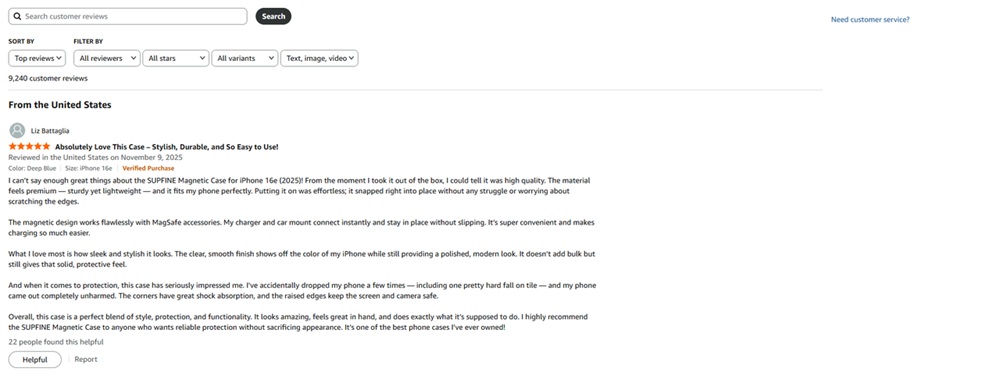
From a single review block, you can capture a rich set of fields. A solid Amazon review scraper can help you gather at scale:
Review title: the quick summary of the experience
Review body: the main content, where real insight lives
Star rating: numeric rating (1–5 stars)
Review date: useful for trend analysis over time
Reviewer name: not for contacting, but for deduping and basic segmentation
Verified purchase flag: helps you focus on genuine buyers
Helpful votes count: prioritizes reviews others found useful
Media attachments: presence of images or videos (or their URLs)
Variant information: size, color, flavor, etc., which helps you see which variants cause issues
Country/marketplace: useful if you sell in multiple regions
How to scrape Amazon reviews in minutes with Automa? (No-code way)
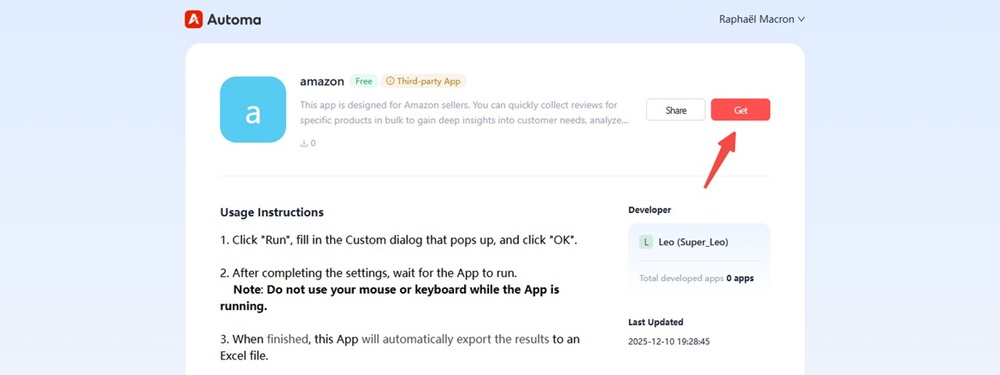
Step 1 Click the “Get” button to open the review scraping tool page.
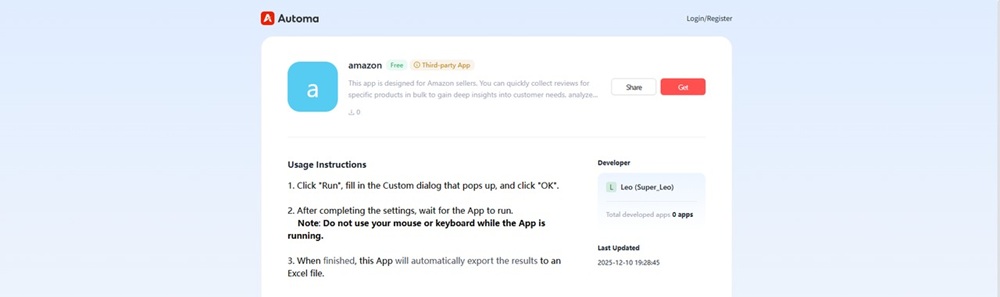
Step 2 Sign up for a free Automa account and log in.
If you don’t have an Automa account yet, click “Login/Register” in the upper-right corner. You can sign up using GitHub or any email provider.
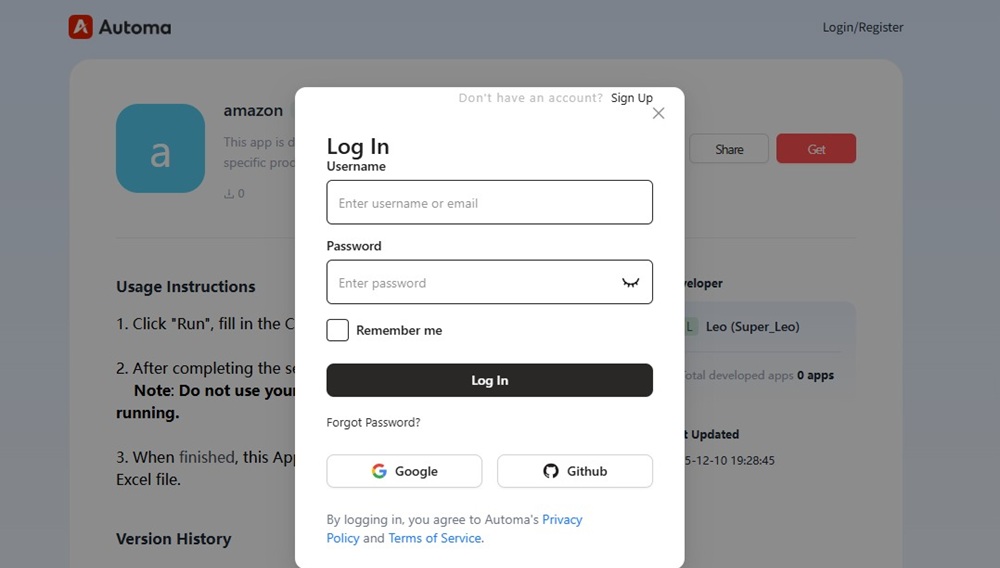
Step 3 Get the Amazon scraper
After logging in, click the “Get” button to save the Amazon Review Scraper to your Automa workspace.
Step 4 Download the Automa desktop app
Go to the Automa homepage and download the Windows version of the client.

Step 5 Run Automa and install web automation extension
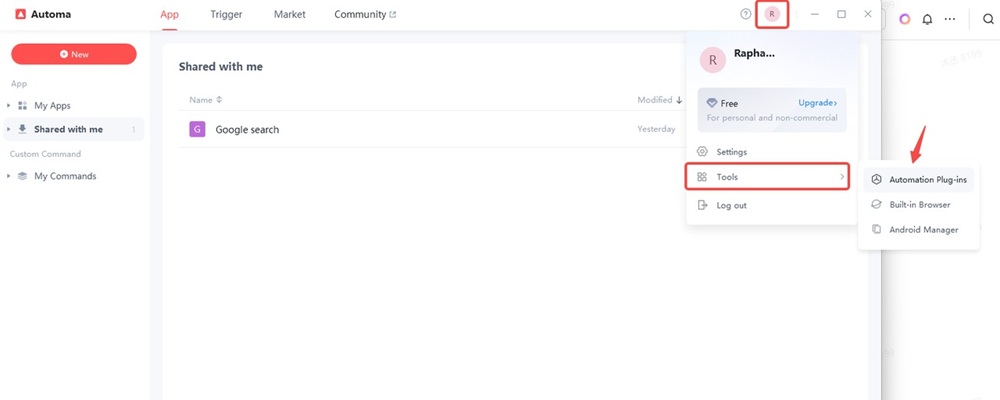
Open the Automa app on your desktop and sign in with the account you just created. Click your profile icon in the upper-right corner, go to “Tools,” and select “Automation Plug-ins.”
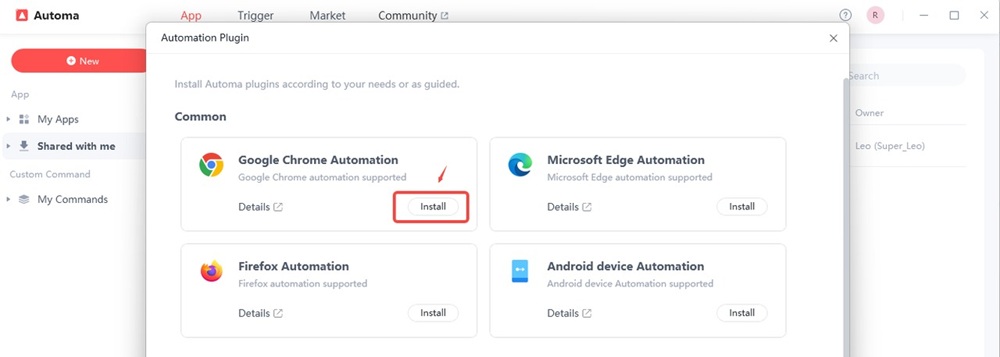
In the pop-up window, locate “Google Chrome Automation” and click “Install.” This completes the installation of the Automa automation plug-in.
Step 6 Run Amazon reviews scraper
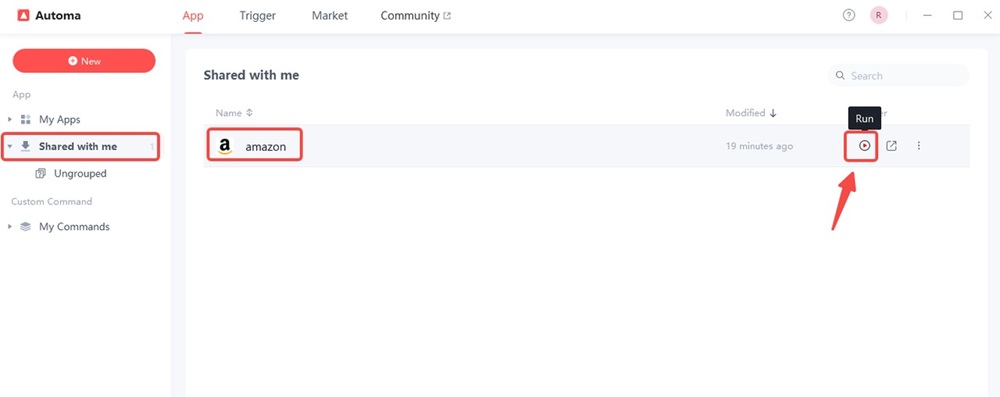
In the left navigation panel, click “Shared with me” and find the Amazon Review Scraper you just saved. Find the play button on the right and click it to run the workflow.
Step 7 Collect the Amazon review page URL
Log in to your Amazon account. Find the product you’re interested in and open its review page. Press “Ctrl + C” to copy the URL of the product’s review page.
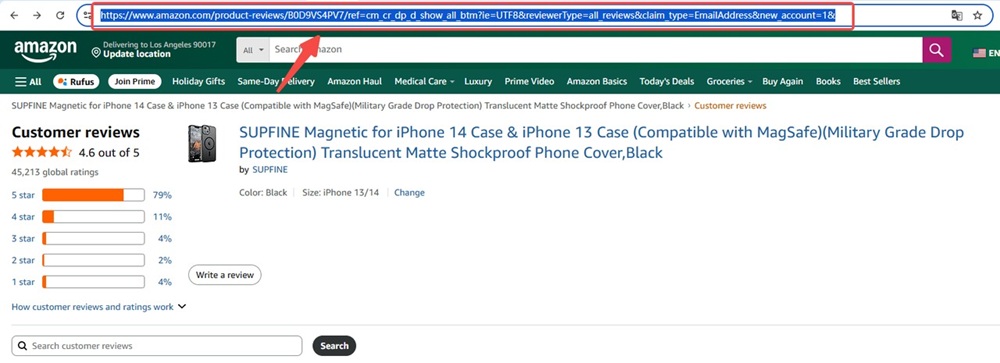
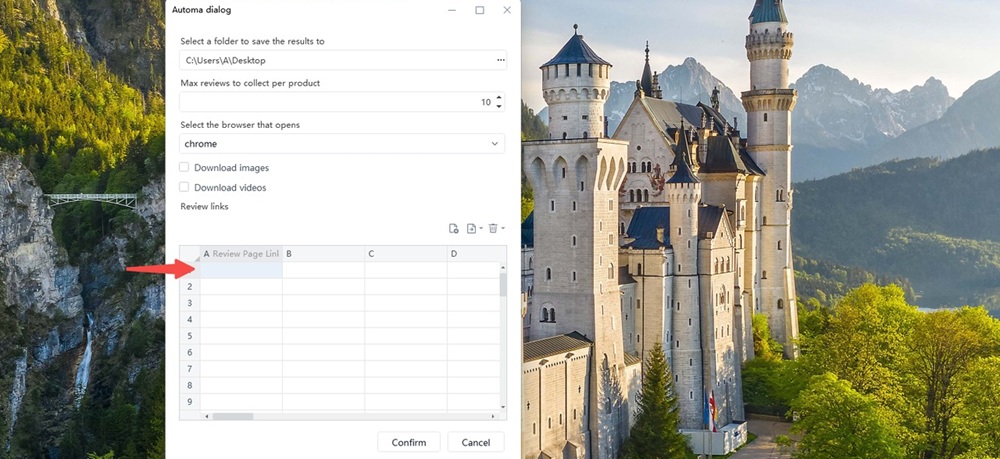
Step 8 Add the Amazon product URLs you want to scrape
Paste the URLs you just copied into column A of the table and click “Confirm” to start the tool. You can use multiple links in one run. If you’re just testing the tool, you can set the number of reviews to 10 to save time. Our tool is completely free, and the current maximum number of reviews you can scrape per product is 999.
Step 9 Check the results
It only took you 18 seconds to scrape the Amazon product reviews.
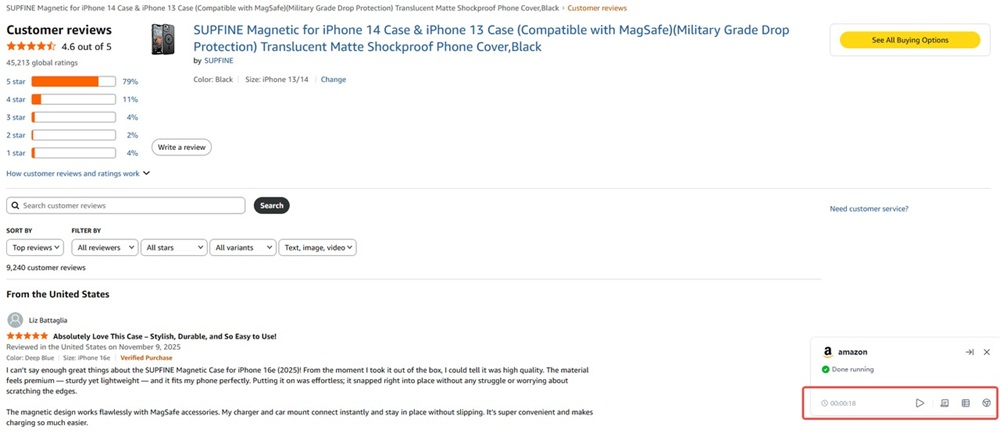
The file is saved directly as an Excel file in your desktop folder.
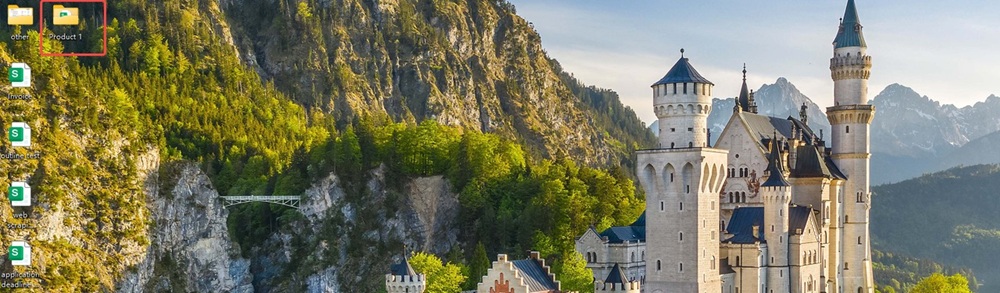
Open your Excel file, and you’ll see the following content:

This tool can scrape Amazon review titles, reviewers, ratings, location & time, and review details. By following the steps above, you’ll have clean, organized data. Now it’s time to try it yourself and start using this no-code, free Amazon scraper software.
What are Amazon's anti-scraping measures?
Amazon does not allow uncontrolled, large-scale data scraping by bots. To protect its platform, even if you are browsing the site as a real user, Amazon may sometimes verify whether you are human or a bot through the following anti-scraping mechanisms:
Rate Limiting
If you send too many requests too quickly, Amazon may temporarily block or limit your access. You might see error pages, CAPTCHAs, or abnormal HTML structures while scraping.
CAPTCHA and Bot Detection
Amazon uses various techniques to detect non-human activity. When it receives rapid page requests from a single IP, detects repeated requests, or notices other suspicious behavior, it often triggers a CAPTCHA to verify that you are a real user. If your scraper cannot bypass the CAPTCHA, it will immediately stop scraping.
HTML Layout Changes
Amazon regularly updates its page layout and structure. Hard-coded scrapers that rely on fragile selectors can break overnight.
IP Address Blocking
Amazon constantly monitors IP addresses. If your IP exhibits suspicious activity, Amazon may block it, requiring you to change your IP to continue.
Given these measures, it is essential to use reliable tools or adjust your scraping strategy —keeping it slow, polite, and limited.
Is it legal to scrape Amazon?
Automating the scraping of Amazon data usually violates its Terms of Service and carries the risk of account suspension or legal consequences. The risk is relatively low for small-scale personal use, but it’s high for commercial purposes. A safer approach is to use the official Amazon API or other legitimate third-party data sources to access product and review information. Using Automa RPA with human-like interactions poses almost no risk.
Conclusion
Amazon reviews are a live feedback engine for your niche. If you are not using them, you are letting others learn faster than you. With the right amazon review scraper, you can collect structured data at scale, understand customer needs, validate product ideas, improve your own products, and feed insights into automated workflows.
You do not have to be a developer. No-code tools and web automation give you quick wins for free or at low cost. When done correctly, amazon reviews scraping becomes a competitive advantage that compounds over time.
FAQs
Can I scrape Amazon reviews for free with Automa?
Yes, for personal use, Automa offers a free tier for individual users. This allows you to run automation scripts locally on your own computer without paying for an enterprise license. Inside the Automa client, there is an "Market" where other users share their automation scripts. You can often find pre-built "Amazon reviews scraper" applications here for free.
Do I need coding skills to extract Amazon reviews with Automa?
No, you do not need coding skills to extract Amazon reviews with Automa. The software is designed specifically for non-programmers using a "Visual" or "Drag-and-Drop" interface. While you don't need code (Python/Java), you do need Logic. You can extract reviews using two "No-Code" methods. Automa has a built-in "Market" where other users share bots they have already created. You only need to install and run it. You simply enter the Amazon Product URL, and the pre-built bot handles the extraction for you. If you want to build your own custom scraper, you use a flowchart approach rather than writing code.
How many Amazon reviews can I scrape at once?
Amazon has anti-bot measures in place, which limit the number of reviews you can scrape for free. Your script will usually be blocked by IP bans or CAPTCHAs after collecting between 30 and 150 reviews. If you want to scrape large amounts of data (thousands of reviews), you need to use and pay for rotating proxy services to get around these limits.
What is the best format to export Amazon reviews?
For most workflows, CSV or Excel is ideal, because you can open and analyse the data in spreadsheets, BI tools, or basic scripts. If you want to put reviews into a database, app, or machine learning pipeline, JSON is often better.
Can I create my own Amazon scraper on Automa?
Yes, you can build an Amazon scraper with Automa AI automation. Automa includes web automation and data extraction features that people use to scrape product pages, even Amazon.